Visits, actions and hits: what does speo count?
Visits, actions and hits measure different things. Understand the Matomo reports and find out which tracking requests use your speo allowance.
Content checked on 08.11.2026
At a glance
Visits and actions describe recorded website activity in Matomo. The speo allowance counts accepted tracking actions and, if additional chatbot tracking is enabled, chatbot requests.
In this article
Visits, actions and hits count different things. In Matomo reports, visits and actions describe the activity recorded on your website. The hit allowance in speo shows how much of your plan you have used.
What counts as a visit
A visit is a continuous session of activity on your website. One person can make several visits, for example by returning later or using another device. By default, Matomo starts a new visit after more than 30 minutes without a tracked interaction. Crossing midnight or arriving from a new campaign can also start a visit under the standard rules.
Visit counts therefore do not count individual people. “Unique visitors” also depends on which browsers Matomo can recognise. The Matomo visit documentation explains these rules in more detail.
What Matomo records as an action
Actions include:
- recorded page views;
- clicks on tracked download links;
- clicks on links to other websites;
- recorded internal searches;
- configured events, such as clicking a particular button.
One visit can contain several of these actions. Page views are part of the action count. An event adds an action without creating another page view. See Matomo’s definition of actions.
Which hits use your speo allowance
speo counts tracking actions accepted for recording. Each accepted page view, event or download click uses one hit. Loading an ordinary logo, image or stylesheet from your web server does not use an additional speo hit. Heartbeat pings that measure visit duration do not add hits to the allowance either.
The allowance includes accepted actions while processing is still in progress. Actions confirmed as discarded are deducted; actions with an unresolved processing outcome remain counted. The allowance can therefore temporarily differ from the Matomo reports already available.
The allowance covers the websites in your account together. It renews each subscription month, including on Mini and when you pay annually. The portal shows the current period’s start and the next renewal. A Matomo report covering whole calendar days does not automatically cover that exact period, including its times.
Matomo also uses “hits” for other types of tracking. Use the allowance shown in the customer portal to check the usage of your speo plan.
If additional chatbot request tracking is enabled for your website, each accepted chatbot request also counts as one hit. These requests appear in separate bot reports. They create neither a human visit nor an action in a person’s visit history.
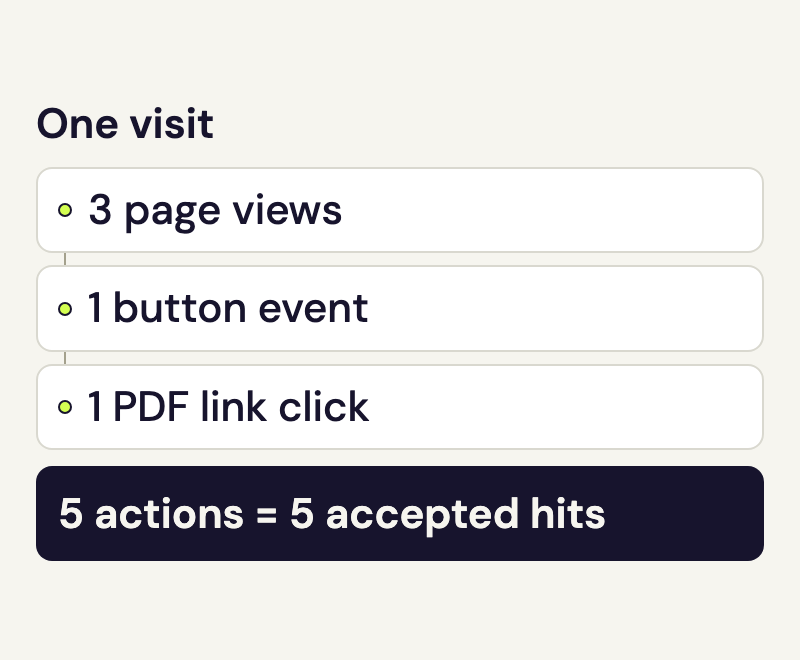
Visits, actions and hits in one example
Someone carries out these tracked steps during one session:
- They view three pages.
- They trigger a configured button event.
- They click a PDF link, recorded as a download.
This produces one visit, three page views and five actions. If speo accepts those five tracking actions, they use five hits of the allowance. Additional Heartbeat pings do not change that hit count.
Check hits and reports in your account
- Open Overview and read the monthly allowance, its period start, next renewal and update time.
- Open Reports and choose the website you want to check. The “Visits” report also includes the action count; the “Actions” report includes page views and downloads.
- Check the date range and update time of the loaded report. To compare it with the full Matomo interface, select the same website and corresponding dates there.
The Create reports guide explains how to load and export that selection.